What is social prescribing?

Social prescribing, which is often known as a community referral, allows health professionals to refer people to a range of local, non-clinical services, such as adult education.

At the WEA, we have a long history of working with adults who are dealing with life’s challenges, and we often find that social prescribing can help alleviate these issues.

Social prescribing has always been part of the WEA offer.

We recognise that adult education can be a great option when looking at social prescribing routes, as it helps people make positive life choices, as well as helping to improve mental and physical health.

Our research, as seen in our WEA Impact Report, demonstrates that of those who had taken part in a WEA course:

Image showing 87% of WEA learners make on average one less GP visit versus the national average, 61% said it improved their mental health, and 94% said WEA courses help keep their mind active

We work with social prescribing Link Workers to provide support to patients referred from their GP or health care professional, community connectors, health providers and voluntary and community sector organisation.

We do this by providing non-clinical support to adults within the community.

Our social prescribing package consists of a choice of offers designed to protect and enhance wellbeing.

They range from mental health, physical well-being to digital skills and safety. We are always looking to enhance, adapt and grow our offer.

If you wish to discuss your needs further, then please contact Katie Easey via [email protected], or fill in the webform below.

Social prescribing


Courses for carers

We have designed our courses for carers to fit in with their needs. They are all online, so there is no need to travel, and our tutors understand that sometimes carers need to take a break from their responsibilities. Learn more about courses for carers on our caregiver's course page. 

Physical Health Offer

Aims to improve health and wellbeing through a wide range of physical and practical activities.

  • Healthy Living
  • Cooking on a budget
  • Gentle Exercise
  • Yoga

Digital Support for Wellbeing Offer

Helps to develop confidence online, and helps with learning and employment.

  • Accessing services
  • IT Skills
  • Safety online

Mental Health Offer

Supports those with low level mental health issues and we offer bespoke learning services for those with more serious mental health issues.

  • Confidence
  • Resilience
  • Communications & connections
  • Crafting for well-being

There is power in a union

The WEA has a longstanding tradition with trade unions in supporting, developing and educating your members.

Founded in 1903, we’ve been a key part of the labour movement for over a century.

We are a registered charity and largest provider of largest voluntary sector provider of adult education in the UK.

We work together with trade unions to empower your members and union reps through adult education. 

A flexible approach to learning

We can offer national online courses or courses in local venues. Our flexible approach means we can develop courses for union members that meet your specific needs and supports your members through different challenges.

Offering learning and skills as part of union membership can be an additional benefit for joining. 

Corporate social responsibility is at our core. We have a special mission to raise aspirations and develop educational opportunities for the most disadvantaged.

This includes providing basic maths, English and IT skills for employment.  

Courses for union members and reps

We offer a range of courses that can meet the needs of trade union members including:  

Facing change together

Redundancy support, reskilling, employability,

Promoting success and progress

Digital skills, functional skills, ESOL, retraining, leadership and management,

Creating healthy workplaces

Stress, wellbeing, health and safety courses, workers' rights and labour exploitation, 

Lifelong learning

Arts and crafts: humanities, sciences, languages and culture.

What's next for your members?

Many of our standard courses are government-funded, so will come at no extra cost for your members.

We also offer bespoke courses for your union that are competitively priced to ensure union learning remains affordable for all.

Want to know more? Think we can help?

Simply fill in the webform below and someone from our Trade Union learning team will be back in touch.

What is the Prevent duty?

The WEA is committed to safeguarding all learners and stakeholders from the risks of radicalisation and extremism. In line with our responsibilities under the Prevent duty, we actively work to identify and reduce these risks, ensuring individuals are not drawn into terrorism or influenced by extremist political, social, or religious ideologies. 

Our approach is proactive, inclusive, and rooted in promoting a safe and supportive learning environment for all.

Our vision and values as an organisation commit us to promote:

  • Democracy
  • The rule of law
  • Individual liberty
  • Mutual respect, and tolerance (For the many cultures, faiths and beliefs found in Britain today)

In doing so we aim to:

  • Create safe learning environments
  • Training staff to spot signs of radicalisation
  • Encouraging open discussions about controversial topics in a respectful way
  • To recognise and explore both the benefits and the challenges of the rule of law
  • Supporting learners to understand and appreciate diversity

These are the values, defined by the government, as British values and are part of the Prevent Duty.


Our approach in the WEA is to integrate the Prevent Duty

We do this with:

  • Good teaching and learning,
  • Encouraging learners to engage critically and actively around their study,
  • Promoting our values, mission and purpose,
  • Ensuring that equality, diversity and inclusion are embedded in everything we do,
  • Encourage learners to become members of the WEA, be active citizens, and contribute to their communities.

This approach not only meets the legal requirements of the Prevent Duty but also strengthens the WEA’s mission to empower adults through education.


Recognising a concern

The WEA encourages anyone to raise concerns in relation to the Prevent Duty, such as:

  • Concerns about individuals being groomed- For example, if someone appears to be influenced or manipulated by others into adopting extremist views or behaviours

or

  • Concerns about fundamentalist beliefs- Especially when these beliefs lead to oppressive behaviours, intolerance, or support for terrorist ideologies.

How do I report a Prevent concern?

At the WEA, your safety and the safety of others is our top priority.

If you have concerns about:

  • Your own safety or well-being, or
  • The safety or well-being of someone else, including concerns related to radicalisation or extremist influences,


Please speak to your tutor or contact the WEA Safeguarding Team immediately.

They will explore your concerns and if necessary, report them to professional organisations for appropriate action.

For more information on the WEA Prevent policy and Safeguarding Policy, visit our policies page.

In the first instance you can watch our helpful videos below. Need further help? Our contact details are below.


Our friendly learner services team are always happy to help.

You can fill out the form on this page, and we'll be back in touch as soon as we can with you by email.

Live chat is available between 9am and 4pm Monday-Friday, which you can access by clicking the 'Chat with our team' button on your screen at any time. (The chat button will not show if no chat agents are available).

Lastly, you can call us on 0300 303 3464, Monday - Friday, 9am to 4:30pm.

In the first instance you can watch our helpful videos below, there are two versions, one for desktop/laptop and one for mobile/tablet. Need further help? Our contact details are below.


Our friendly learner services team are always happy to help.

You can fill out the form on this page, and we'll be back in touch as soon as we can with you by email.

Live chat is available between 9am and 4pm Monday-Friday, which you can access by clicking the 'Chat with our team' button on your screen at any time. (The chat button will not show if no chat agents are available).

Lastly, you can call us on 0300 303 3464, Monday - Friday, 9am to 4:30pm.

Why does the WEA Curriculum look different this year?

The curriculum this year is designed to enable us to continue supporting a wide range of learners and to continue offering a broad range of learning activities. 

The world around us is changing rapidly, and we need to adapt and evolve:

  • Devolution is accelerating
  • MCAs (Mayoral Combined Authorities) are progressively dictating what they require (skills-focused) and their target audience
  • Funding cuts are real
  • Tailored learning is being deprioritised as the public purse tightens 

Helping people into work is a really important part of our charitable aims, but we also believe in a broader curriculum because adult learners have a range of needs and can face different barriers. 

We recognise that we need to have a range of different solutions, and we want to respond positively with intent. We have reorganised our curriculum in response to this.

How does the new curriculum work?

We will provide Adult Skills learning and Tailored Learning, and we will continue to champion Tailored Learning—but we know that we have to do things differently. Across all of our work, there will also be an emphasis on tackling economic inactivity, promoting digital inclusion, supporting health and wellbeing, and strengthening communities.

What is WEA Learn?

We believe that learning helps people tackle the big challenges of modern life—and that is not limited to formal education. 

Learning for the joy of learning is a good thing. WEA Learn is a new way of accessing our vibrant history, art appreciation, and literature courses online, delivered outside of state-subsidised funding. 

It provides the same high-quality learning, with the same outstanding tutors, and we have made it easier to access.

Where are all the cultural courses in Art Appreciation, History, and Literature?

These remain an important part of our curriculum. However, how learners register for and access our cultural provision is changing. These courses are moving to Eventbrite under the WEA Learn brand, offering an improved learner experience.

Why are there fewer courses on WEA Learn than we would normally have?

We are testing the delivery of a variety of courses via this method this year and will scale up if demand is strong. This will be continually reviewed.

On WEA Learn, how has the course price been set?

We have researched a range of online provision, including attending courses. We believe in the quality of our teaching and learning, and in offering value for money. We have set our introductory rate to balance these two elements.

Why have prices changed so much?

Adult Skills Funding (ASF) course fees at WEA have remained unchanged (£3.70 for online courses and £4.20 for face-to-face courses) for several years. We have resisted the need to pass these fees on to learners for a long time, but we now face significant funding cuts and a substantial increase in our costs. 

For WEA to continue operating sustainably, we must increase hourly fees. We have researched a range of online provision and, compared to similar organisations, we still charge the lowest hourly rate. WEA Learn is a standalone service that is being tested, and we have worked to deliver it at competitive rates.

I have done this course for years, why is it no longer funded?

We recognise how important some of these courses were to you. However, we have had to reorganise our curriculum to rise to the challenge of current and future realities, to ensure that we can continue to deliver on our mission. 

The WEA is campaigning to protect lifelong learning. We champion its positive impact on health, wellbeing, inclusion, employment, and community connection. Sadly, the Government takes a narrower view—focusing on skills for work, cutting funding, and deprioritising Tailored Learning as we know it. 

If you disagree with the Government’s policy, please join us in advocating for adult education and write to your MP using this template.

I have been told that the course I want to do is not available to me—why is that?

If the course is not available to you, it is because the curriculum in your area has been reorganised to meet the needs of learners and employers in your community. Please be reassured that our ambition is to provide the courses our learners want and need. If a course is no longer funded, we will seek to add it to our WEA Learn offering.

Why is X course not available in my area now?

If the course is not available to you, it is because the curriculum has had to change due to cuts in funding. 

The scale of our offering is now more standardised and focused, providing a core statutory offer to meet our MCA contract requirements and new statutory opportunities (e.g. DWP, Connect to Work, Plan for Neighbourhoods, Digital Poverty, Step Into Care, Resettlement, etc.). 

We will offer lifelong learning opportunities through our WEA Learn platform—a learner-funded curriculum initially focused on Art Appreciation, History, and Literature. Once successfully launched, further subject areas and lecturers will be added to our offering.

Why can’t I enrol on multiple courses?

For WEA Learn courses, you will be able to book onto multiple courses, and we will be adding new courses and lecturers regularly. 

For our funded curriculum, the Information, Advice and Guidance (IAG) conversation with an Enrolment Agent will ensure you are on the right course. This may involve a variety of courses, with different learning aims, to support your learning journey.

Why can’t I see hourly fees on the Eventbrite courses?

Hourly fees are a mechanism aligned with statutory funding rules, which do not apply to WEA Learn. WEA Learn offers a range of high-quality learning opportunities with easy access and clear pricing—so the prices listed are for the full course.

How will I access WEA Learn courses on Eventbrite?

We have signposted these via our website (the WEA Learn dropdown), click here, or you can search directly on Eventbrite for “WEA” or your chosen tutor. The sign-up process has been designed to be very easy to access, and learners will receive a link directly to the email address used to book the course.

How can I find my favourite tutors courses? 

Step 1 – Search the WEA website. If the course they teach falls under our funded provision and is currently live, you will be able to find it using the search facility. If not, try Step 2. 

Step 2 – The course and tutor may be teaching or lecturing within WEA Learn. If so, you can search directly on Eventbrite (all tutors will be tagged). Click here.

If you still can’t find your favourite tutor’s courses through these steps, it means they have no current courses available at this time. Please keep checking, as new courses will be added throughout the year.

My tutor told me that they are available and want to teach the course I want, but WEA won’t let them – why is that?

We recognise how important some of these courses were to you. However, we have had to reorganise our curriculum to rise to the challenge of current and future realities, to ensure that we can continue to deliver on our mission. 

The WEA is campaigning to protect lifelong learning. We champion its positive impact on health, wellbeing, inclusion, employment, and community connection. Sadly, the Government takes a narrower view—focusing on skills for work, cutting funding, and deprioritising Tailored Learning as we know it. 

If you disagree with the Government’s policy, please join us in advocating for adult education and write to your MP using this template.

Please note that we do have aspirations to increase the WEA Learn offer throughout the year

What are the advantages of WEA Learn?

We have listened to our learners and stakeholders and simplified our course application and enrolment processes to make it easier for learners to book onto courses that are not government-funded. 

WEA Learn introduces a simple and straightforward process using the widely used booking platform, Eventbrite. This means there is no requirement to submit residency or personal income evidence to join a course. 

As a learner, you will receive all the necessary links directly to your personal email address. You will also experience a more standardised presentation of the learning experience. 

Furthermore, it removes the postcode lottery—all learners, regardless of where they live (including Scotland), can access our History, Art Appreciation, and Literature courses.

How do I complain further?

Please follow the WEA complaints procedure, which you can find here.

This is a short guide to accessing the WEA member account.

Please choose the dropdown option you need below for instructions.

I need to set up my member account

If you haven't already used the members area, you will need to do this first. If you have already done this, please move to step 2 below.

  • Visit www.wea.org.uk/user/register
  • Enter your email address and a username (we recommend you use your email address as your username too).
  • You'll receive an email to set your password. Follow the instructions in the email and remember to keep your password safe.

Once the website checks you are a WEA member, you will be ready to log in.

Please note, that your WEA member account is a separate account and login from your Learner Hub account.

I want to log into my member account

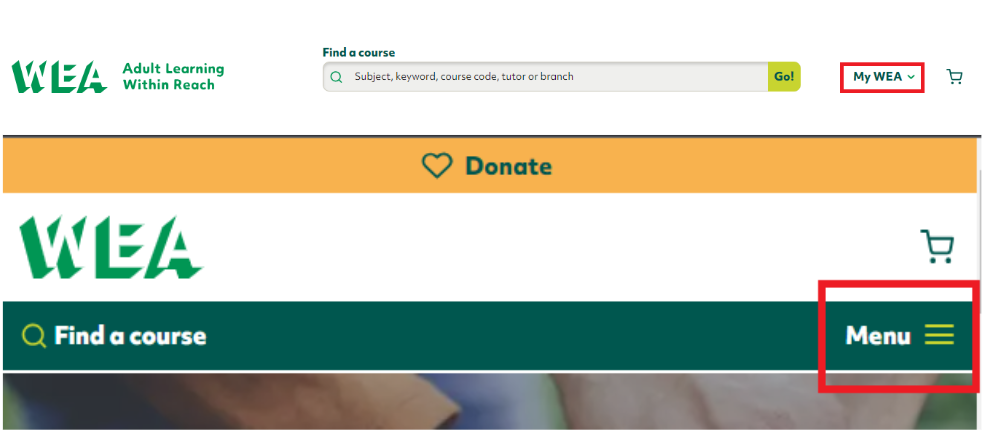
Once you have chosen a password, log in by visiting www.wea.org.uk and click on the ‘My WEA’ link, selecting the ‘Member/Volunteer login’ link. You can then enter your user name and password.

If you have forgotten your password, you can request a new one from here.

You can see where to find 'My WEA' on a desktop or mobile/tablet below.

Hamburger menu image

If your membership has expired, you will be able to log into your online account. You won’t be able to see or access the members’ area, or access priority booking if this is the case.

I have forgotten my password and need a new one

Visit www.wea.org.uk and click on the ‘My WEA’ link, selecting the ‘Member/Volunteer login’ link. 

You can request a new password from here. It will be sent to the email address on your member account (the one you receive member emails to).

You can see where to find 'My WEA' on a desktop or mobile/tablet below.

Hamburger menu image

If your membership has expired, you will be able to log into your online account. You won’t be able to see or access the members’ area, or access priority booking if this is the case.

Further questions?

You can contact the membership team via [email protected].

Contact us
I am most interested in (tick all that apply)

How do we use the information we gather from you?
Please see our privacy policy.

Members' priority booking begins 11:00am, Monday 2nd June.

This guide will help you book a course online, and answer any questions you may have about the new processes.

You can also book via telephone by calling 0300 303 3464 between 9am-4:30pm.

You will be taken through the same steps detailed below, and asked the same questions, via telephone.

Payment can be made on the telephone or through the WEA Learner Hub.

There are four steps to be able to book online during the member's window:

1- Set up your member account

If you haven't already used the members area, you will need to do this first. If you have already done this, please move to step 2 below.

  • Visit www.wea.org.uk/user/register
  • Enter your email address and a username (we recommend you use your email address as your username too).
  • You'll receive an email to set your password. Follow the instructions in the email and remember to keep your password safe.

Once the website checks you are a WEA member, you will be ready to log in.

Please note, that your WEA member account is a separate account and login from your Learner Hub account.

2- Log in to your member account

Once you have chosen a password, log in by visiting www.wea.org.uk and click on the ‘My WEA’ link, selecting the ‘Member/Volunteer login’ link. You can then enter your user name and password.

If you have forgotten your password, you can request a new one from here.

You can see where to find 'My WEA' on a desktop or mobile/tablet below.

Hamburger menu image

If your membership has expired, you will be able to log into your online account. You won’t be able to see or access the members’ area, or access priority booking if this is the case.

3- Find some courses!

At last, the fun part!

New courses will be live from 11:00am on Monday 2nd June. Have a browse on the website, find a course for you and add as many as you like to your basket: the more the merrier!

4- Check out through our Learner Hub

Once you have added all your courses, click the 'Apply' button,

You will then go to our Learner Hub to complete your application.

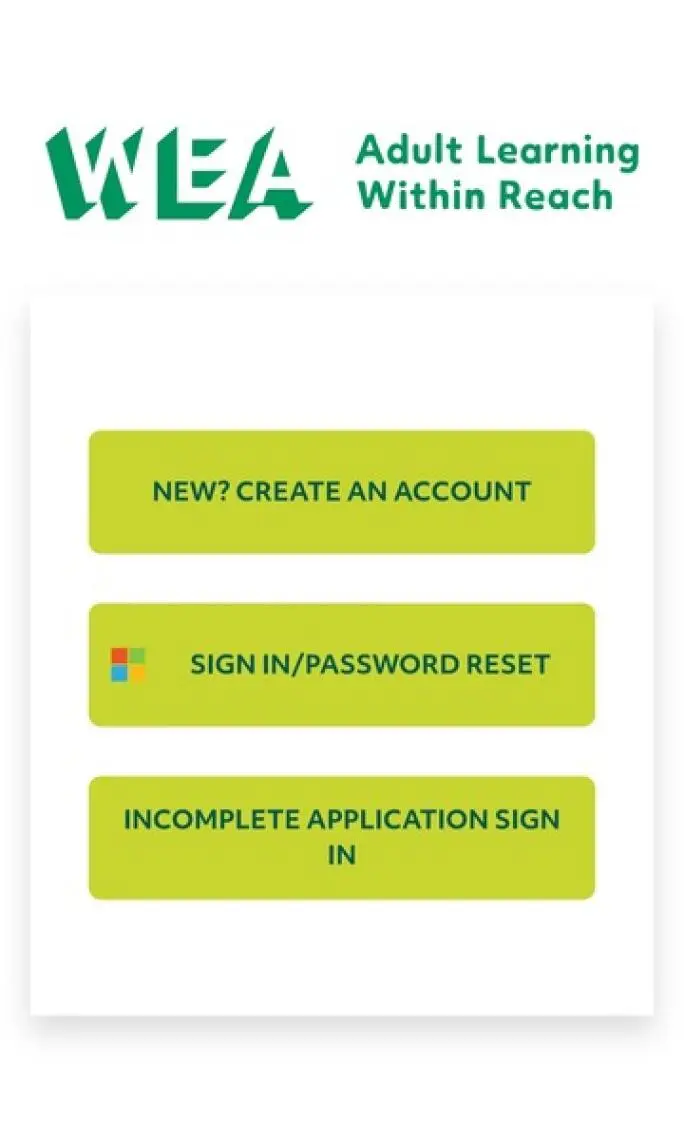
You will see one of the below screens, depending if you are on a computer or on a mobile phone/tablet:

New to us? (Desktop) or New? Create an account (Mobile/tablet)
If you are new or have never booked a course with us, you create your account here. 

Already have an account? (Desktop) or Sign in/password reset (Mobile/tablet)
If you have a WEA Learner Hub username (an email address that ends in @wea.ac.uk) you can log in or reset your password here.

Need to finish an application? (Desktop) or Incomplete application sign-in (Mobile/tablet)
If you are waiting to hear about an application, or are part-way through completing an application, sign in here. This is for anyone who has not received their @wea.ac.uk details yet and will be the email address you gave when first signing up.
 

Please note, that your Learner Hub account is a separate account and login from your WEA member account.

You will need to pay for your course at the end of the booking via debit or credit card. If you feel you are entitled to fee remission, you will need to complete your booking via telephone. 

Please note if your basket also contains a skills course or a learning for life course that you will need to provide your ID and NI number as before, either during the application or before the course starts. The form will make clear what ID is acceptable.

Once you have completed all of the questions, your application(s) will be confirmed via email.

If you have not learned with us before, you will also receive your Office 365 details via email. This contains instructions on how to access your WEA-issued Microsoft 365 account. This will be a @wea.ac.uk email address and is unique to you.

This account lets you access materials relevant to your course, including Canvas, and a record of all your previous courses you have done with us. You can also keep your personal details up to date in here.

You can learn more about Microsoft 365 and its benefits here

When you first log in you will need to choose your password. 

You will also need to set up Multi-Factor Authentication (MFA) to keep your account safe. We suggest you read the FAQ below to learn more about it and 

You can learn more about MFA and its benefits here.

You may have further questions about the booking process, including why we ask you certain questions when booking.

The FAQs below may be of some help:

Why are there so many questions asked when booking?

If you have learned with us before, you will recognise most of the questions asked. Some of these may seem personal, or irrelevant to your personal circumstances.

By answering these questions, it helps you continue to pay the lowest price for your courses. This is because we will continue to receive funding or part funding from the government or our funders for that course.

A few examples are below:

  • Ethnicity: To monitor the distribution of ethnic groups amongst learners.
  • Employment status: To monitor the economic activity of learners
  • Sex: To describe the structure and nature of the learner population.
  • Providing your National Insurance Number (if doing a skills or life skills course)

To find a full list of questions, and the reasons why they are asked, please visit the gov.uk website here.

The WEA chooses to ask some optional questions through the booking process. This includes gender and preferred pronouns. We are a champion of equality and inclusion: learn more at our EDI page here.

How do the WEA keep my data safe?

The data collected in the booking process ensures:

  • that funding is being spent in line with government targets
  • quality and value for money
  • robust future planning
  • to make the case in seeking further funding.

The data you give us we keep within secure systems, including our student record system.

Learn more in our Privacy Policy by clicking here.

Further questions?

Our friendly learner services team are always happy to help.

You can fill out the form on this page, and we'll be back in touch as soon as we can with you by email.

Live chat is available between 10am and 4pm Monday-Friday, which you can access by clicking the 'Chat with our team' button on your screen at any time. (The chat button will not show if no chat agents are available).

Lastly, you can call us on 0300 303 3464, Monday - Friday, 9am to 4:30pm.

Contact us
I am most interested in (tick all that apply)

How do we use the information we gather from you?
Please see our privacy policy.

A number of learners have had problems logging in with their new wea.ac.uk login details.

On many occasions this is because Microsoft is identifying their credentials for other organisations, for example many schools and businesses also use Microsoft logins.  

Sometimes Microsoft will recognise and show you the accounts to choose from, so please just choose carefully your wea.ac.uk account name.  

On other occasions it will try to immediately use your other account details because it recognises them. If this happens to you, please shut down Learner hub, and then logout of your other Microsoft accounts by visiting https://login.microsoftonline.com/logout.Srf.

Then you can re-open Learner Hub and successfully enter your wea.ac.uk details.

Further questions?

Our friendly learner services team are always happy to help.

You can fill out the form on this page, and we'll be back in touch as soon as we can with you by email.

Live chat is available between 9am and 4pm Monday-Friday, which you can access by clicking the 'Chat with our team' button on your screen at any time. (The chat button will not show if no chat agents are available).

Lastly, you can call us on 0300 303 3464, Monday - Friday, 9am to 4:30pm.

MFA is an additional layer of security to protect your data.

Why am I asked to set up MFA?

When you sign into any online account ‘authentication’ is how you prove that you are who you say you are. In the past, this has been done through a login and password, however, this is no longer secure as many hackers have found a way to guess or bypass this method of ‘authentication’.

This is why you will notice more and more services, including your bank and online shopping, asking you to further prove you are who you are by sending a code to you either through email, text, or a specific app. To protect all our learner’s data, we have had to do the same.

Being MFA protected also means you will be able to reset your password yourself if you ever forget it, without having to contact our Learner Services team.

How to setup MFA

When you first log into Learner Hub with the details sent to you in the ‘Welcome to the new WEA digital experience’ email, you will be asked to set up how you wish to authenticate.  

Learners will be prompted to tell Microsoft 365 one of the following when first logging in:

  • Personal email address
  • Mobile phone number
  • Authenticator App setup

The most common choice is to download the Microsoft Authenticator app onto your mobile phone.

But, we know that not everyone has a mobile, so you can choose to authenticate by text message, email, or phone call. If that is what you wish to do, just click on the ‘I want to set up a different method’ button on the bottom left of the window, as indicated below.

You will then choose your recovery email address, enter your mobile phone number or be given instructions to install the authenticator app.

Image showing the choosing of an authentication method

Check out our video guide to MFA below:

Video transcript

0:00

hello and welcome to this short video on

0:01

how to set up multifact authentication

0:03

on your WEA account multimax

0:06

authentication is sometimes referred to

0:08

as MFA for short and we may use both

0:10

terms in this video and also in the

0:12

communications that we send out to you

0:13

but they mean the same thing

0:16

if you'd like to know more about

0:17

multifacts authentication or why we're

0:19

asking our Learners to take the step

0:20

then please refer to the communications

0:22

that we have sent out or alternatively

0:24

to some of the links that are below

0:26

now before we set up our multifactal

0:29

authentication you'll need two things

0:31

the first is your learner login details

0:33

this will have been sent to you in your

0:35

welcome email

0:36

in the welcome email you will have

0:38

received an email address ending in at

0:41

wa.ac.uk and also a password

0:44

make sure to have this on hand as we go

0:46

through the various steps

0:47

in addition to the learner login details

0:50

you'll also need either a mobile phone

0:52

or your own personal email address

0:54

now it's really important this email

0:56

address is not your wa.ac.uk email

0:59

address but a personal one that you can

1:01

access easily

1:03

as this will be where the authentication

1:05

process takes place

1:07

we've heard from our Learners that they

1:08

prefer not to use their mobile phone and

1:10

use an email address so this is what

1:12

this video will focus on

1:14

so once you've got these things ready

1:16

let's take our first step

1:19

the first step is to open up your

1:21

internet browser you can use any but for

1:23

this video I'll be using Chrome

1:26

now when you're on Chrome you want to

1:28

visit

1:29

ourwa.org dot UK website

1:33

once you're inside our website you want

1:35

to click on the my way section here

1:37

you'll have the option of the learner

1:39

hub login staff home staff Hub or

1:41

members of volunteers login you want to

1:44

click on learner hub login

1:47

now you have three options to join as a

1:50

new learner return as an active learner

1:52

and sign in or return as an applicant

1:54

who has not learned with us for over a

1:56

year you want to want this second option

1:58

active learner and press sign in

2:02

when you press this button you'll be

2:04

asked to put in your email address this

2:06

will be your at wa.ac UK email then

2:09

you'll need to press next and then

2:11

you'll be asked to put in your password

2:13

after you've entered your password which

2:15

again will have been in your welcome

2:16

email you'll come onto this screen where

2:19

it'll tell you that more information is

2:20

required when you've got to here please

2:23

press next

2:32

I'm being asked for my password again

2:34

which may happen to you just input it

2:37

and then you'll be asked to either stay

2:39

signed in or to choose not to do this

2:42

for the purpose of this video I'll click

2:44

no

2:48

once you've done this you'll be asked

2:50

you will be taken to this site where

2:52

you'll be asked to keep your account

2:54

secure now the option that Microsoft

2:57

gives you is to download the

2:58

authenticator app as we've said we know

3:00

that many Learners have said that they

3:02

prefer not to do this what we want to do

3:04

is go on this option at the bottom of

3:06

the screen that says I want to set up a

3:08

different method

3:09

once you click on this you'll be given

3:11

the option to click on either

3:14

authenticator app email or phone you

3:17

want to click on email confirm this

3:19

Choice and then you'll be asked to type

3:21

in your email address again it's really

3:23

important that you don't use your

3:24

waac.uk email address but instead your

3:27

personal one here I've created a test

3:30

account which I'll be inputting

3:41

when you've done this the screen will

3:44

tell you that a code has been sent to

3:46

that personal email address that you've

3:48

just put in you want to go on to your

3:50

personal email address and you should

3:52

have received an email on behalf of

3:53

Microsoft

3:54

if you open up this email you'll see a

3:57

code has been sent to you just copy this

4:00

code and take it over to your other

4:02

screen

4:03

and paste it over

4:05

then you want to click next

4:10

when you've done this you'll get a

4:11

screen that says keep your account

4:13

secure success great job you have

4:15

successfully set up your security info

4:17

choose done to continue signing in

4:19

you'll want to do this and then you'll

4:21

be within the learner Hub and able to

4:22

access your learner profile and also

4:26

canvas

4:27

we hope that this video was nice and

4:28

easy for you to follow but if you have

4:30

any questions or this is not what

4:32

happens when you go through the Journey

4:33

please refer to our learner service team

4:36

who's been contacted Ira for the chat

4:38

function or also over mobile phone

4:41

and telephone they also have an email

4:43

address which will keep at the bottom of

4:45

this video thank you and goodbye

How do I reset my password WEA Microsoft 365 password? 

You can only reset your password if MFA has been successfully set up. 

  1. On any login page, when you click on the sign in link, click on the ‘forgotten password’ or 'can't access your account' option
  2. Choose 'work or school account'
  3. You will need to enter your @wea.ac.uk email address on this screen
  4. You will be asked to choose your method for verification. Choose either the authenticator app, call, or text, depending on what methods you chose when setting up the MFA process.
  5. Enter the one-time passcode from the email, call, text or authenticator app
  6. You can now reset and choose your new password 

If you require assistance, please contact student support services via the details below. 
 

How long does my account stay active? 

WEA Microsoft 365 accounts remain active if you are currently on a course, have booked onto a future course, or have been on a course in the last 12 months. 
 

What is Single Sign On (SSO)? 

Single Sign On (SSO) is a way of simplifying how you access systems, by logging into your wea account you are signed into to other systems – such as you log once and have access to Outlook, Teams, OneDrive & Learner Hub without having to log in to each application.

Further questions?

Our friendly learner services team are always happy to help.

You can fill out the form on this page, and we'll be back in touch as soon as we can with you by email.

Live chat is available between 9am and 4pm Monday-Friday, which you can access by clicking the 'Chat with our team' button on your screen at any time. (The chat button will not show if no chat agents are available).

Lastly, you can call us on 0300 303 3464, Monday - Friday, 9am to 4:30pm.